
ID: 428
Category: Computer Ramblings
Added: 18th of May 2026
Views: 491
I am finding it increasingly annoying how it feels like we are slowly creeping towards a time where you will need to be in possession of a smartphone to be able to get anything done, which is completely wrong. It feels like we are falling down this smartphone hole, with no way out.
In my mind there should always be an option for people who don't want to use a smartphone, which companies are simply forgetting about.
Before smartphones we coped. There was no over analysing about every aspect of life, or finding something someone said online 10 years ago to try and prove a point. We were not bombarded with people filming every aspect of their own life, or exposed to every single issue that was going on in this world, and more importantly we had far more control over our data.
I honestly think we were a lot happier for it, and it was generally better for our overall mental health. Smartphones also have this awful way of making us put things off, because it's far easier to sit on the sofa and scroll than it is to actually get up and do something.
If you used your phone in the old days it was to read or compose a text message, answer a call or play a quick game of snake, that was it. We probably only charged our phones once a week, now it feels like my house is just full of chargers.
This got me thinking if there was a way for me to partly distance myself away from my own smartphone and still be able get things done, so I created a list of things I use my smartphone for now and what my alternatives are.
Online Banking
My banking app makes it so easy to manage my account, transfer money.
The alternative is to use my PC, which requires a lot more work to login, however the positive thing about banking on your PC is that your not as risk of losing your PC or having it stolen, like you can with your smartphone. The other good thing about online banking via a PC, is that it does offer a few more features that are not covered through the app. One of these is the ability to download statements over a longer period of time. Then there's also the screen space that you don't get on a Mobile.
The only downside to banking on your PC especially when using Windows is spyware and viruses, but security has massively improved massively over the years.
WhatsApp
WhatsApp has been great for contacting family abroad, especially having the ability to send photos in seconds. That beats the cost of a regular phone call.
The alternative is to use WhatsApp on your PC, which can be downloaded for Windows, Mac, but there doesn't appear to be a version for Linux. If you want to send a photo then you need to use a Digital Camera, then transfer that to your PC and upload it via WhatsApp.
Car Parking
I use my smartphone to pay for parking, It's really quick and convenient. When I arrive at the car park, I open the app and then enter the 5 digit code displayed by the pay meter, enter the number of hours I want to park, and click accept.
The alternative is using the keypad at the actual meter to enter my car registration number, number of hours I want want to park, and then pay via Debit Card using chip and pin. Obviously if the machine is not functioning and you don't have a smartphone, then you cannot pay for parking.
Ebay
I sell a lot of old stuff on Ebay. Using the Ebay App has once again been really convenient for getting listings up and running fast, as I can take the photos of the item with my phone at the same time as I list.
The alternative is to use the Ebay website, take photos using a regular digital camera, download these to your PC then upload them to Ebay.
Navigation / Mapping
Google Maps is brilliant on mobile and great for navigation when driving. The other alternative is to purchase a standalone SatNav.
Before all of these we used proper maps and common sense. One thing that occurs now and causes a little bit of stress, is putting your trust in the device and wondering if the thing is sending you in the correct direction.
Blocking Certain Websites
If your constantly doom scrolling and wasting time on Android devices, there doesn't seem to be a free and effective way to block websites without downloading another App or paying for another service.
On PC it's free and can be easily accomplished by simply editing the hosts file. One thing I have noticed by blocking certain websites is how lost I have felt for a few seconds. However that time now gets taken up my doing something productive instead.
Buying a Dumb Phone
Older dumb phones are great, the only downside to all these is that they only work on 3G which will eventually be phased out completely, however the alternative is to buy a modern dumb phone like the Nokia 6310,
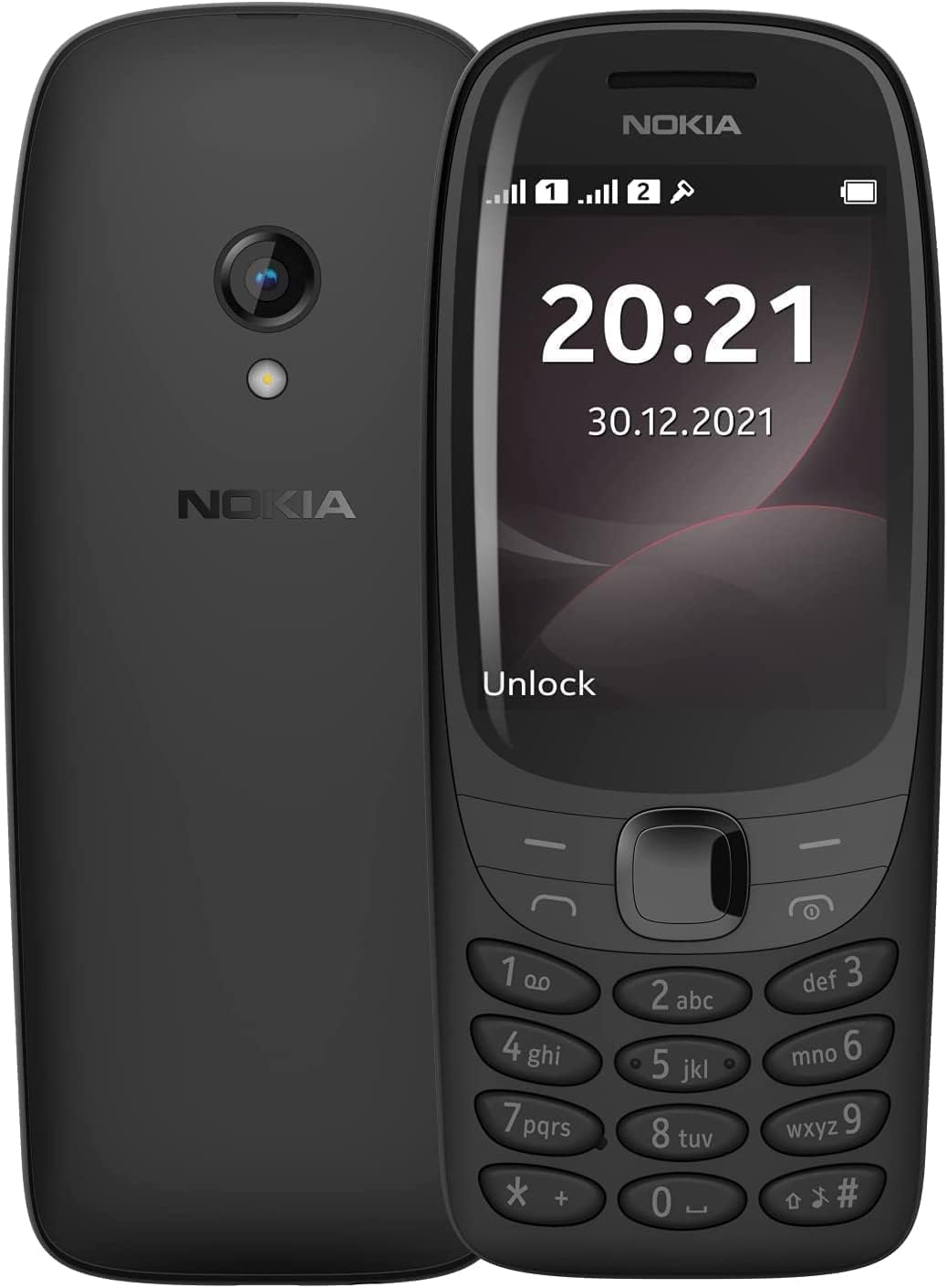
If you still need your smartphone, but need a break, you could take a modern dumb phone out with you in the day time, and return to your smartphone in the evenings. Will you really miss anything by not using WhatsApp or visiting sites like Reddit, Facebook, X and others for a few hours, the answers in most cases is NO.
One thing I have found by not taking my own smartphone out, is that it has been one less thing to think about.
