noscript-img
HomeAboutLinux NewsResourcesPrivacy
My Computer Tips Home

MariaDB find and replace text in database field using phpMyAdmin

ID: 420

Category: MariaDB Database

Added: 16th of January 2026

Views: 425

phpMyAdmin logo

There may be occasions when you need to perform a find-and-replace operation within your database. If you lack terminal access to MariaDB which is common with shared hosting, you can easily accomplish this using phpMyAdmin within your hosting control panel.

Open phpMyAdmin and select the SQL tab.

Enter the following query, replacing the placeholders with your actual table and column names:
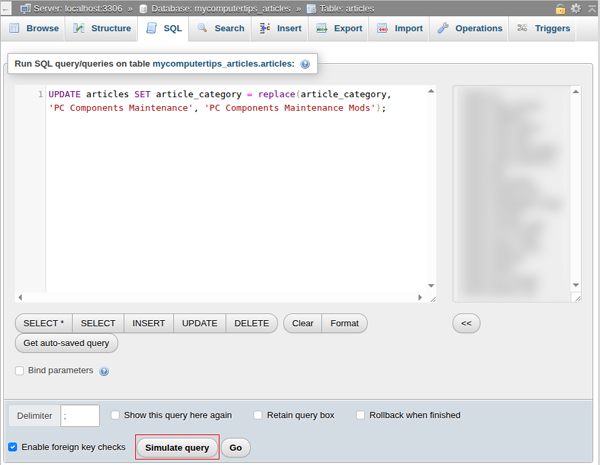
UPDATE tbl_name SET field_name = replace(field_name, 'old_text', 'new_text');

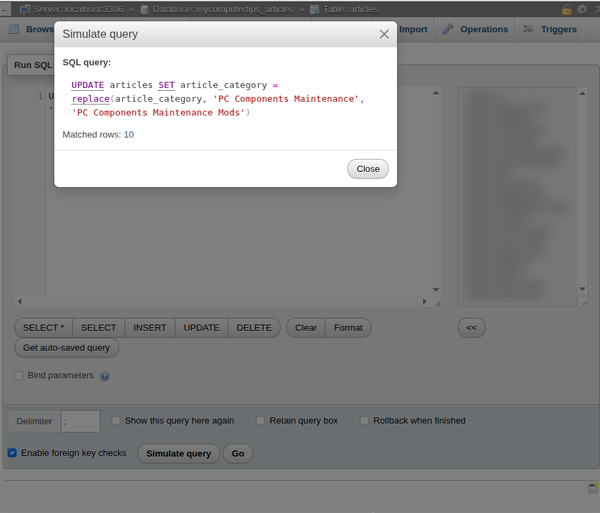
Before executing the query on your live database, use the Simulate query feature in phpMyAdmin. This allows you to see exactly how many records will be affected before any changes are finalised.

Select SQL Tab
Simulate the query

PinterestFacebookSitemap Valid CSS!