How do I automatically launch Steam in Big Picture Mode on Linux
ID: 407
Category: Steam
Added: 20th of August 2025
Views: 4,279
Related Tips & Tutorials
➔
Turn your Linux distribution in to a Smart TV➔
Building a custom PC, mounting the motherboard and finding a case

Here are two ways to launch Steam in Big Picture mode on Linux
Launch Steam then goto Settings > Interface > Start Steam in Big Picture Mode
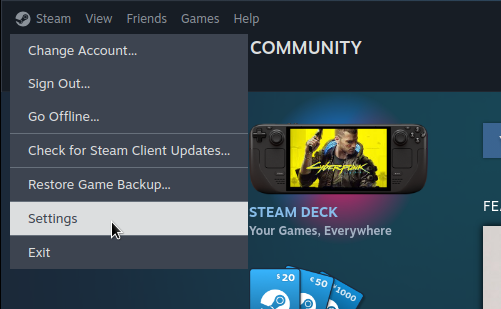
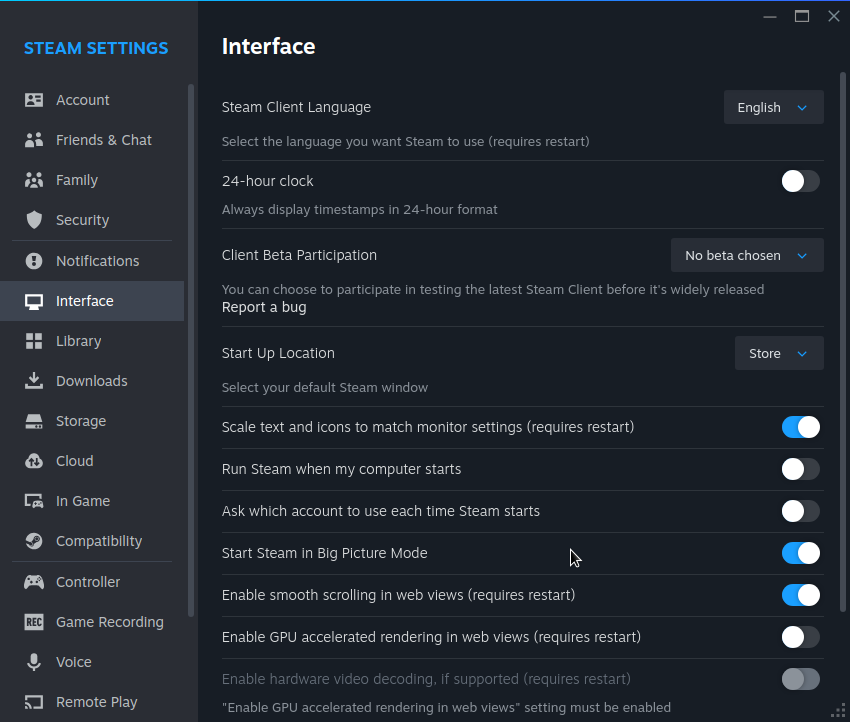
You can also launch Steam in Big Picture mode using the terminal by entering the following command
steam -gamepadui
If you are thinking about building your own Steam Machine, you will want to launch Steam in Big Picture Mode. After this you will need to launch Steam on startup in your Linux distribution, and automatically login as a user.

